Wireless 5G
Wireless 5G is to customize the Router’s 5GHz wireless settings, including SSID and password, mode, channel, channel width and transmit power, and so on.
Go to General Settings >> Wireless 5G and follow the steps below to configure it.
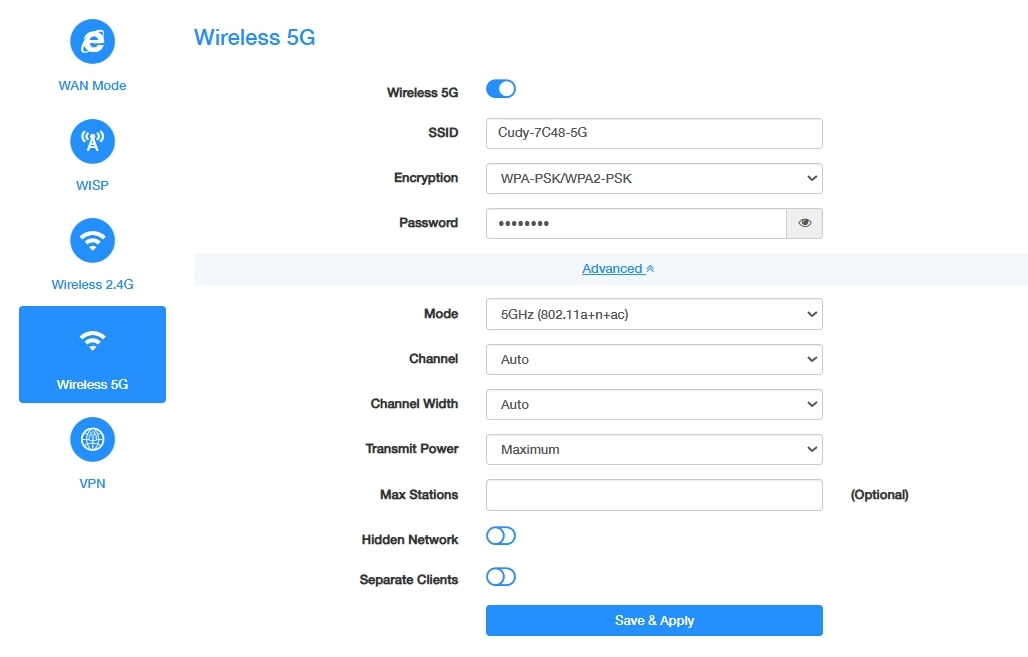
- Enable Wireless 5G;
- Customize your SSID (wireless network name);
- Select a strong Encryption and create a secure Password for your wireless network. Click Save & Apply to save these basic settings, or Advanced to continue with more and advanced settings.
- Select a proper Mode, Channel, Channel Width and Transmit Power;
- (Optional) Enter the maximum number of devices you want to allow on your network in the Max Stations field.
- Enable Hidden Network, if you don’t want your SSID to display automatically. Then you need to manually join the network.
- (If any) Enable Separate Clients to isolate the wireless clients from each other.
- Click Save & Apply to apply your new settings.