System Status
On the System Status page, you can check the status of the router system. In Wireless Router mode, it includes Status, Devices, WAN, LAN, Wireless 2.4G, Wireless 5G, IPv6, VPN, DHCP Server, and System; while in Wireless Access Point mode, there will be Status, Devices, LAN, Wireless 2.4G, Wireless 5G, DHCP Server, and System.
-
System Status in Wireless Router mode
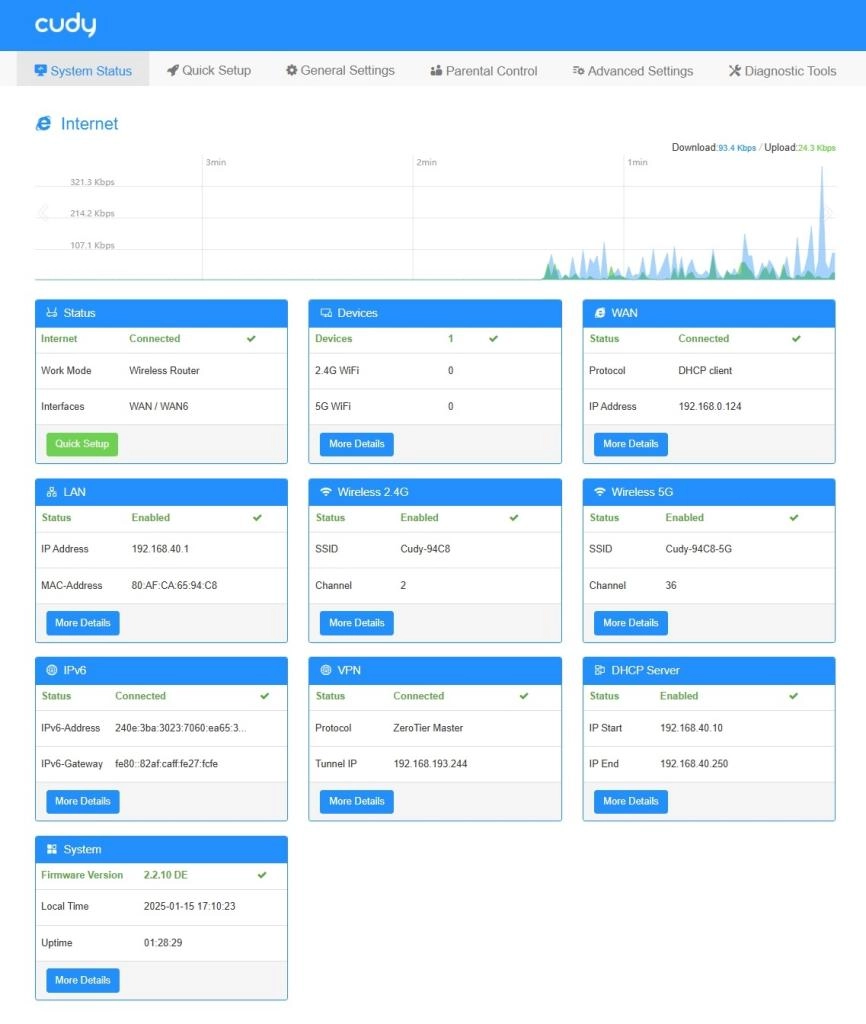
-
System Status in Wireless Access Point mode
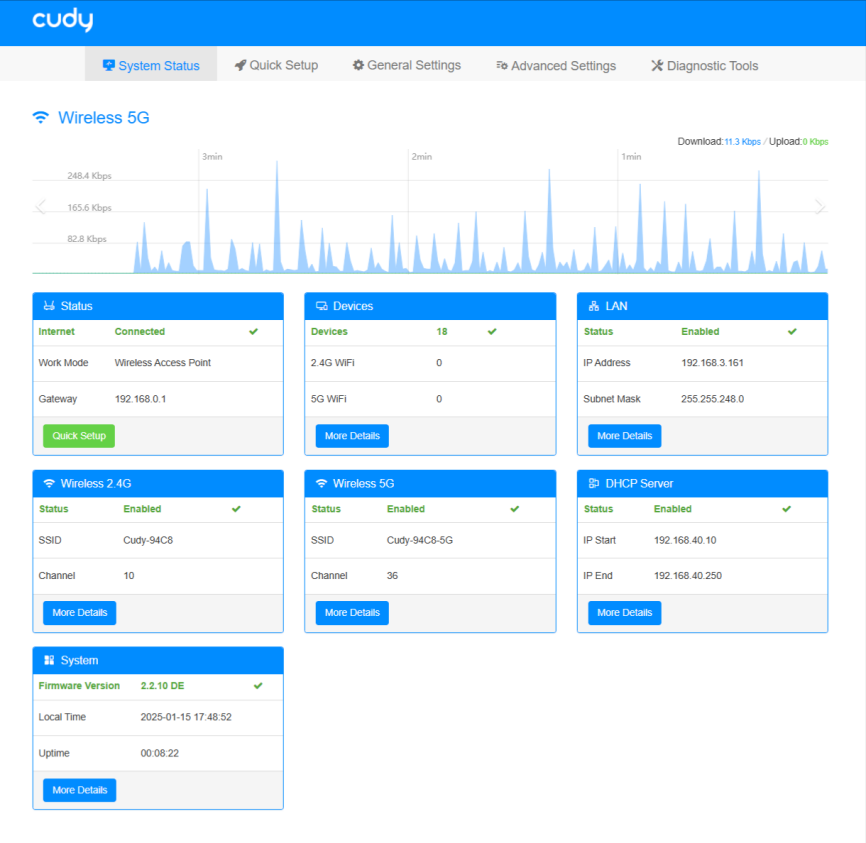
Note
Images of WR3600 are for reference only; details may vary by model.
-
Status: Shows whether the router has connected to the Internet or not, and its work mode and interface. Click Quick Setup to redirect to the Quick Setup page.
-
Devices: Shows the number of devices connected to this Router, via Ethernet cable or 2.4G WiFi or 5G WiFi. Click More Details to know more information about these devices, or configure the settings.
- Internet: Click to enable/disable the Internet for the devices.
- VPN: Click to enable/disable VPN for the devices.
- Operation: Click to pop up the editing page as below, where you can customize the device name and limit the download/upload rate.
-
WAN: Shows the WAN port connection status. Click More Details to know more information about it or make changes.
-
LAN: Shows the connected LAN port status. Click More Details to know more information about it or make changes.
-
Wireless 2.4G: Shows the Wireless 2.4G status. Click More Details to know more information about it or make changes.
-
Wireless 5G: Shows the Wireless 5G status. Click More Details to know more information about it or make changes.
-
IPv6: Shows IPv6 connection status. Click More Details to know more information about it or make changes.
-
VPN: Shows VPN connection status. Click More Details to know more information about it or make changes.
-
DHCP Server: Shows the DHCP Server status. Click More Details to know more information about it or make changes.
-
System: Shows the System status. Click More Details to view more information about it.
- Status: Shows the Router info about firmware version, model, hardware version, local time and uptime.
- Statistics: Shows the detailed traffic information of each interface in the statistics list.
- ARP: lists the connected devices' IP address with its bound MAC address, Hostname and Interfaces.
- Active IP Routes: table contains a list of routes to network destinations associated with and known by the Router.
- System Log: tracks all the Router behaviors. It is used for technical support to diagnose and troubleshoot for the Router.
-
Mesh: (Optional. Mesh availability varies by model.) Shows the router’s Mesh network status (SOLE or MESH), the mesh device name and the amount of mesh units. Click More Details to know more information or add/manage mesh unit(s).