Install & Power
Note
Power off the router before installations
Install Nano SIM Cards
-
Press at the SIM1/2 slot to pop out the SIM tray(s).
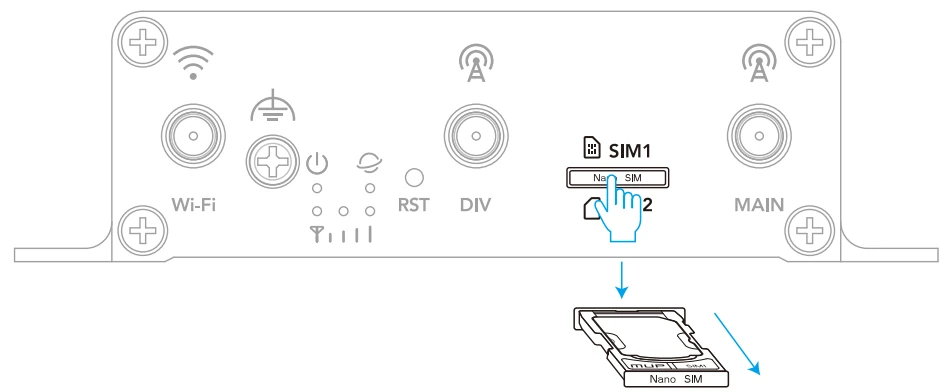
-
Put the Nano SIM card(s) in the SIM tray(s) as diagram shows.
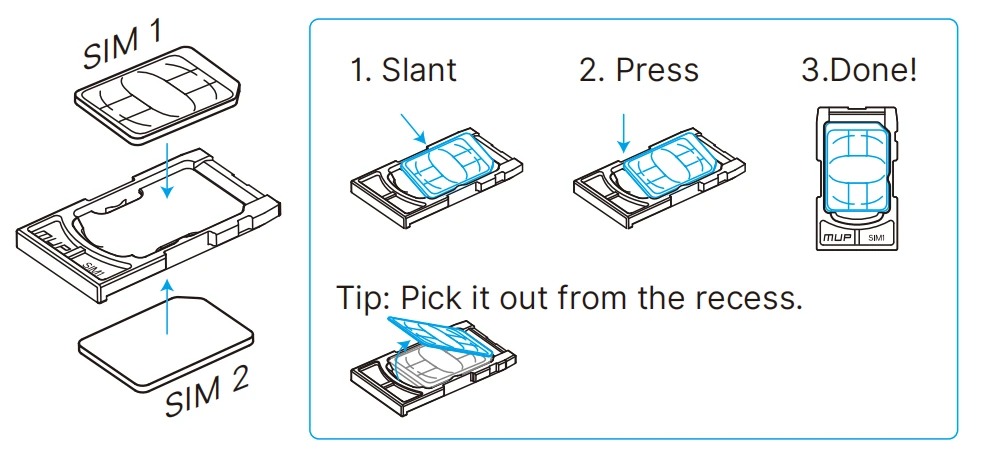
-
Push the SIM tray(s) back into the SIM1/2 slot. Store the pin back into the SlM Pin slot.
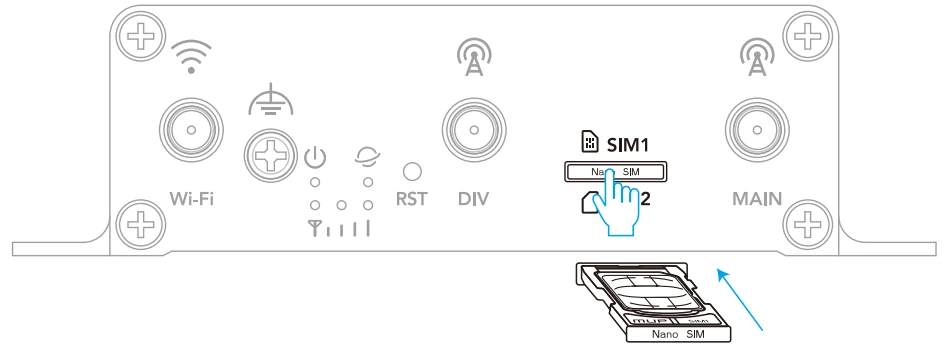
Install 4G and Wi-Fi Antenna(s)
-
Assign the 4G antennas to DIV and MAIN connectors, and Wi-Fi antenna to Wi-Fi connector.

-
Screw the Wi-Fi antenna clockwise to tighten it.

-
Align the connector on 4G antenna with that on the router. Rotate the nut clockwise onto the connector until tight. Then place it on the magnetic base.

Install the Router
Insert the screws through the four mounting holes and fasten them into the wall.

Power Supply
Method A: Connect a switching power supply to the 2-pin terminal block installed on the router (5~36 VDC).

Method B: Connect the provided power adapter to the 2-pin terminal block installed on the router via the provided DC-to-terminal power cable.
